Understanding Basic Network Devices (From a Beginner’s Point of View)
When I first started learning about how the internet actually works, I kept hearing words like modem, router, switch, firewall, and load balancer. At first, they all sounded like fancy boxes with blinking lights .
But once I broke them down one by one, things started to make sense.
So in this post, I’ll explain these devices in simple terms, using real-world examples, the way I wish someone had explained them to me.
High-Level View: How Internet Reaches Your Home or Office
Before diving into individual devices, let’s look at the big picture.
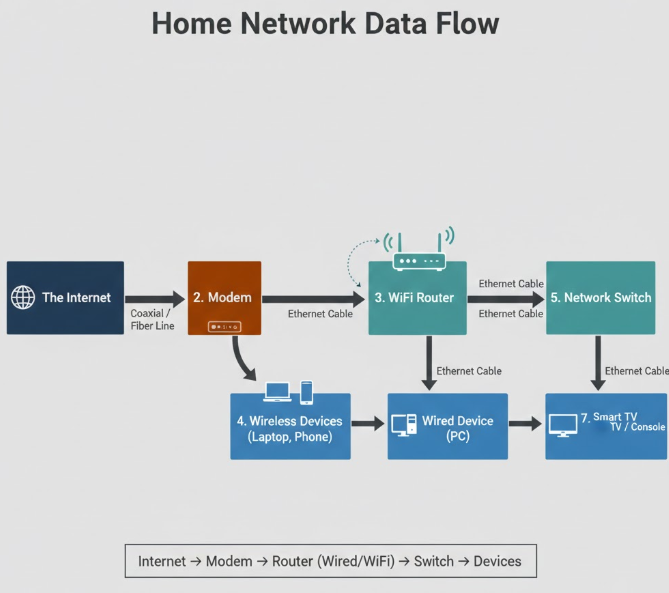
Internet doesn’t magically appear in your laptop. It usually flows like this:
Internet Service Provider (ISP)
⬇
Modem
⬇
Router
⬇
Switch / Wi-Fi
⬇
Your devices (laptop, phone, server, etc.)
In bigger systems (like companies or cloud setups), you’ll also see firewalls and load balancers added into this flow.
What is a Modem? (Internet Translator)
A modem connects your local network to the internet provided by your ISP.
It takes signals from your ISP (fiber, cable, DSL)
Converts them into digital data your network can understand
Simple analogy
Think of a modem like a language translator.
The ISP speaks one language, your network speaks another, and the modem translates between them.
📌 Important point:
A modem usually gives you one internet connection, not multiple devices.
What is a Router? (Traffic Police)
A router decides where data should go.
It connects multiple devices to the internet
Assigns local IP addresses (like 192.168.x.x)
Routes traffic between your local network and the internet
Simple analogy
A router is like a traffic police officer:
Your phone asks for YouTube
Your laptop asks for GitHub
The router makes sure responses go back to the correct device
📌 Modem vs Router (quick difference):
Modem: connects you to the internet
Router: manages traffic within your network
Hub vs Switch: How Local Networks Actually Work
This part confused me a lot initially.
Hub (Old & Dumb)
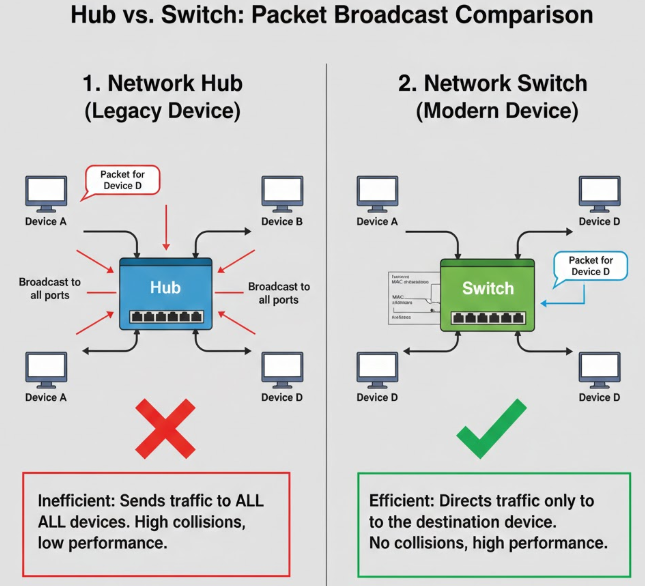
A hub sends data to every device connected to it.
No intelligence
Causes unnecessary traffic
Security risk
Analogy
A hub is like shouting in a room.
Everyone hears the message, even if it’s not for them.
Switch (Smart & Modern)
A switch sends data only to the intended device.
Uses MAC addresses
Faster and more secure
Used in almost all modern networks
Analogy
A switch is like a post office that delivers letters only to the correct house.
📌 Bottom line:
Hub: broadcast to all (almost obsolete)
Switch: smart delivery (used everywhere)
What is a Firewall? (Security Gate)
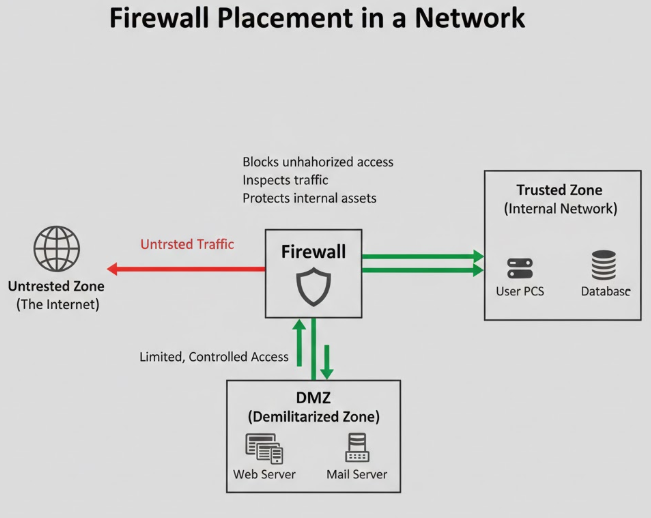
A firewall controls what traffic is allowed or blocked.
Protects your network from unwanted access
Uses rules (ports, IPs, protocols)
Analogy
A firewall is like a security guard at a building entrance:
Allows employees in
Blocks strangers
Checks what they’re trying to do
📌 This is where network security lives.
Firewalls exist:
In hardware
In software (Linux iptables, cloud firewalls)
What is a Load Balancer? (Toll Booth for Servers)
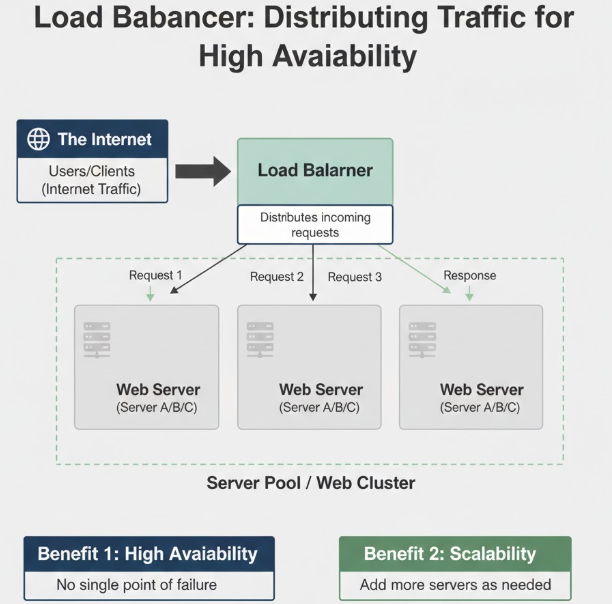
A load balancer distributes traffic across multiple servers.
Prevents one server from getting overloaded
Improves performance and availability
Essential for scalable systems
Analogy
A load balancer is like a toll booth on a highway:
Cars (requests) are sent to different lanes (servers)
Traffic stays smooth even during rush hours
📌 This is very common in backend and cloud systems.
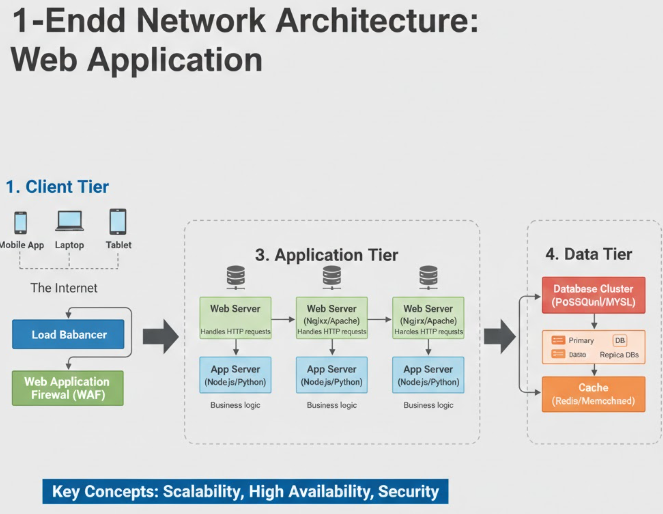
How All These Devices Work Together (Real-World Setup)
Let’s imagine a simple company setup:
Internet (ISP)
⬇
Modem – connects ISP to company
⬇
Firewall – blocks unwanted traffic
⬇
Router – manages internal traffic
⬇
Load Balancer – distributes requests
⬇
Servers (backend apps)
⬇
Switch – connects internal devices
Each device has one clear responsibility, and together they form a complete system.
Why Software Engineers Should Care About This
As a beginner software engineer, I thought networking was “not my problem.” Turns out, it is.
APIs sit behind load balancers
Security rules are enforced by firewalls
Services talk through routers and switches
Production issues often involve network misconfiguration
Understanding these basics makes backend systems feel less magical and more logical.
Comments
Join the discussionNo comments yet. Be the first to comment.